Clean your data with datasets
A dataset is a saved, cleaned selection of a project's finished recordings. Without one, a model learns from every recording. Building one lets you leave out recordings that would teach the model the wrong thing and even out the labels, so it does not favour the most common one.
Open Data, then Clean the data (or Datasets in the left rail), and choose New dataset.
Cleaning steps
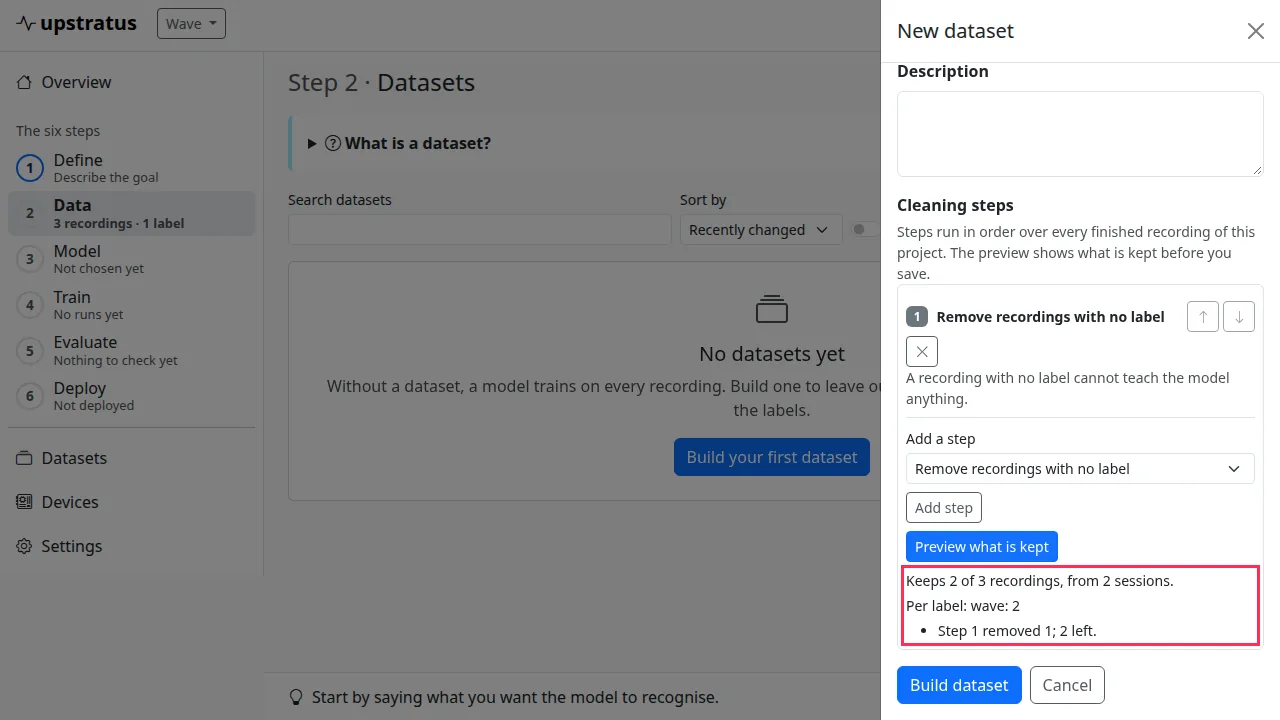
Add steps in the order they should run. Each step sees only what the steps before it kept.
| Step | What it does |
|---|---|
| Remove recordings with no label | Unlabelled recordings cannot teach the model anything. |
| Remove exact duplicate recordings | The same recording twice makes the model over-trust it. |
| Leave out labels | Tick the labels this model should not learn. |
| Leave out sessions | Tick sessions recorded badly (wrong place, wrong grip). |
| Remove labels with too few recordings | Labels with fewer than the number you set are removed. |
| Even out the labels | Keeps the same number of recordings for every label, chosen at random but the same every time. |
Move a step up or down, or remove it, with its buttons. Preview what is kept shows how many recordings and sessions the steps keep, per label and per step, before anything is saved. Build dataset saves it.
A dataset is a snapshot
A dataset keeps the recordings it held when it was built. Recordings you add later are not in it until you choose Rebuild with new recordings from its ⋯ menu. Download list (CSV) lists its recordings. Duplicate copies its steps and recordings under a new name (names are unique within a project).
Once a model has been trained on a dataset, its recordings are part of that model's record: the dataset cannot be rebuilt, its cleaning cannot be changed and it cannot be deleted. Duplicate it to make a changed version, and archive the old one to hide it. A dataset holds recordings, not labels: if you relabel a recording later, the dataset trains with the new label.
Train on a dataset
On the project's Graph tab, edit the pipeline and choose the dataset under Learn from, or set
pipeline.dataset in the YAML. Training then uses only that dataset's recordings.